June 2013
S M T W T F S
« May    
 1
2345678
9101112131415
16171819202122
23242526272829
30  

About

I am The Cyberwolfe and these are my ramblings. All original content is protected under a Creative Commons license - always ask first.
Creative Commons License

Archive for the 'Work' Category

HP ML350/370 G6 Expansion Drive Cage Installation problem

Posted in Geekery, Work on November 5th, 2011

So, you’ve just bought the expansion drive cage (8 more SFF drives! W00t!) and you’ve got the SAS RAID controller Expansion Card as well. Great! Only one problem – HP forgot to include a crucial bit of information regarding how you wire the damn thing in.

Step 1: remove the existing SAS cables from the existing drive cage and motherboard. Discard these short cables.

Step 2: Take the shorter pair of cables from the expansion card kit, and route them from the SAS ports on the motherboard to ports 8 and 9 on the card. Then proceed with running the remaining cables from the two drive cages to ports 2-5 of the card.

The instructions that came with my kit left these two steps out, and I wasted about an hour trying to figure out what I did wrong (Whaddya mean there’s no new drives in the ACU?). Finally found an article with pictures in the HP site, but they could have saved me the trouble by just printing the above two lines in the kit.

How’d the rest of it go? Rather smashing, actually. That server now has 60GB (!!) of RAM and another 900GB of RAID5 storage.

Your test failed the test

Posted in Work on September 27th, 2011

So one of our  Partner suppliers requires that a certain number of our staffers be certified in their product line. It’s been a couple years since the last time we took the test, so our certs have expired and we need to re-certify our people. No problem, right? I mean, we all passed the test last time we took it…

Well, the test is technical in nature, and the guys who work with us understand that the certification itself is kind of a silly marketing/buzzword thing, so they made it possible to take the test directly from their website without a proctor. Us being the devious techies we are, we cheated outrageously – three of us got together in the conference room, threw the test up on the projector, grabbed our copy of the study materials and brought up a Google search window. Then we got serious about cheating and recorded the entire session for reference.

We got through the first taking of the test pretty well – 82%, where 80% is required to pass. Not bad – especially considering there are only 62 questions. (That’s right, 62. No idea why that many.)

Since each time the test is brought up it grabs a different collection of questions from the pool of all possible questions, the second taking was of course different. Sometimes we got the same question with re-arranged answers, sometimes the answers were completely reworded. And sometimes, the questions were pulled from deep in the bottom of the WTF? bucket.

Now here we have three previously-certified techs, taking a test that has not changed in two years, with a full copy of all the study materials, and this thing brought up several different questions that we had never seen anywhere. One even went so far as to use terminology we’d never heard EVER and had to look up in Wikipedia before we had a clue what the question is about.

We failed the test: 79%.

Now, it seems to me that if three previously-certified techs cheating for all they’re worth can still manage to fail your test after already passing it an hour before, then something is wrong with your test.

Legacy Email Relay in SBS 2008 with Exchange 2007

Posted in Geekery, Work on February 5th, 2011

As can be expected, Microsoft made a lot of changes in the SBS 2008 / Exchange 2007 combination, and while it has been out for several years now, I have yet to find any articles or HOWTO’s that specifically address the problems of getting ancient, legacy code to reliably send email alerts with the new systems.

With Exchange 2003, it was simple and mostly just built-in, all you had to do was add the IP address of things like your scanners and other fairly dumb systems (or even advanced ones, like Backup Exec and APC Powerchute) to allow them to relay email alerts through Exchange.

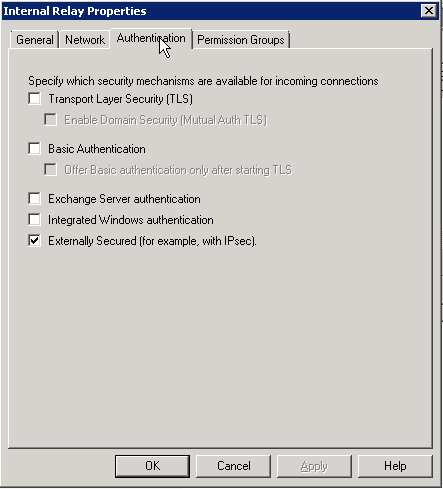
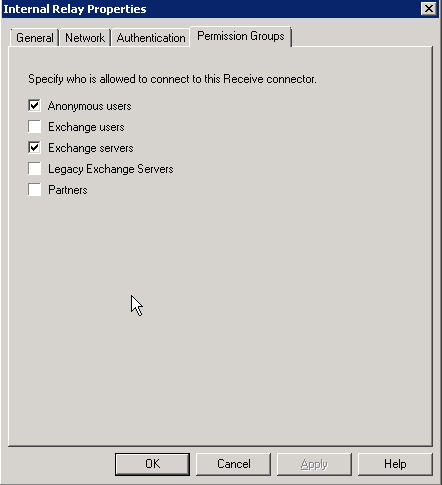
Well, in Exchange 2007, they made things a little more difficult and force you to create new Receive Connectors with specific restrictions to allow these systems. It has been well documented before, so I’ll just include a link: http://msexchangeteam.com/archive/2006/12/28/432013.aspx

I will point out one thing, however: my experience (and a blog posting I cannot find again today) says that to make this actually work, the remote network range for this connector must be 0.0.0.0-255.255.255.255, and not limited to the single machine or short range of IP addresses. I tested this extensively, and always came up with the same result: narrow IP range = no workee. This means that you must create rules on your firewall to strictly limit incoming SMTP traffic to make sure you don’t set up an open relay on the Internet. You should already be doing this anyhow, considering how cheap Postini spam filtering is.

Keep Reading >

How things change

Posted in Geekery, Work on January 19th, 2010

Currently building a server with 20GB of RAM. My first personal computer didn’t have 20GB of hard drive space.

Recognition – I has it

Posted in Politics, Work on June 23rd, 2009

So the Bossman takes a moment this morning to read my response to La Grenouille to the entire crew at our weekly meeting. Said crew makes approving noises, and then Bossman slides a fifth of Captain Morgan’s Private Reserve across the table at me.

I love my job.

Exchange 2003: mail stuck in local delivery queue

Posted in Geekery, Work on April 26th, 2008

This one was a bitch, and since the closest thing I could find to a remedy online was to delete the store and create a new one (not bloody likely) I’ll publish the results of a call to MS Critical Support for the benefit of the masses.

The problem was one user had almost 50 emails stuck in the local delivery queue. They could send email inside and out, but incoming would never get there. I believe the problem was a corrupted mailbox.

To fix the user’s mailbox, I exported their account to a .pst using Exmerge. I then deleted the user’s mailbox and created a new one, adding back in all of their aliases. This got new mail flowing again without too much fuss. The mail in the local delivery queue, however, was still stuck.

To get this going to the right mailbox, we had to ‘recategorize’ the existing mail to the new mailbox.

  1. Stop the SMTP service.
  2. Open Regedit and navigate to the following key:
    HKEY_LOCAL_MACHINE\SYSTEM\CurrentControlSet\Services\SmtpSvc
  3. Creat a subkey named “Queuing”
  4. Select Queuing and on right hand pane create new dword value with name “ResetMessageStatus� with value 1 in hexadecimal.
  5. Restart the SMTP service – check the queues and see if mail is being delivered. Also check the account mailbox at this point.
  6. Once all the mails are delivered to that user, stop the SMTP service and change the value for �ResetMessageStatus� to 0 and start the SMTP service.

That should do it. Seems simple, right? HA! I bashed on it for almost two hours, then called crit support and tech#1 bashed on it for an hour, then called in tech#2 who took another half-hour to come up with the registry fix. We still ended up losing a handful of emails, but that was because it took the user two full days to tell me something was wrong, and our queue alarm didn’t catch the problem.

Which, of course, will be step 3 of this process…


*Update: comments closed due to excessive spam. Glad I could help all of you with this post.

Whaddya mean you don’t support this?!?

Posted in Geekery, Work on February 18th, 2008

A new client was sold a block of 5 static IP addresses for their business by Qwest.

I was dispatched to the client to set up their firewall to make use of these.

Pretty straightforward so far, right? Little do you know.

So I call up Qwest support, because the DSL modem is currently configured to offer DHCP and NAT translation, which is not the end result we want – we need it to just act as a gateway. Strangely enough, I get Bill on the line, who actually used to live around here. (No idea where he is now, he never said.) He promptly tells me that while he understands what I want and has a vague idea of how it is done, it isn’t actually supported by Qwest to do so.

Uhm, excuse me? you mean to tell me that while your company has sold me this product, they don’t really support it, and you have no official instructions on how to configure the modem to make it work?

“Uhm, yeah.” Sez Bill.

Oi.

Being the nice guy he is, however, Bill does his best to help me get things going. I’m pretty sure that at some point he did not actually understand what I was aiming for, but we plowed on nonetheless trying a number of different combinations of settings. During the course of this, Bill let’s me know that one of his supervisors wandered by a few minutes previously and commented that “we don’t really support that”, intimated that it shouldn’t take that long to do, and then wandered off.

“What? Bill, go lasso that man and get his ass onna phone. If he knows how to do it, why the hell are the two of us floundering around with this crap? Track him down!”

It takes a few minutes, but Bill does manage to convince him to get on the phone. And guess what – 10 minutes later, we’re up and running.

Total time on the phone: 2 hours, 15 minutes. Time actually needed for the whole call: 15 minutes, had Bill had proper documentation for this config.

Bill, thanks for being a sport – sorry I killed your stats for the day.

For the rest of us, here’s what you do:

HOWTO configure a Qwest DSL modem for static IP range

Keep Reading >

Holy Crap! This thing is still here?!?

Posted in Life, Work on November 29th, 2007

Uh, yeah. Sorry ’bout ‘dat, I really should ramble more.

Entertainment of the Week: 5 (count ‘em, 1-2-3-4-5) 45-mile round trips to a rural client. One trip was used to install RAM in 4 machines and replace a power brick on a laptop.

That one was funny all on it’s own. Box was delivered to user and open on her desk when I got there. What was the laptop pluged in to? You guessed it, the bad power brick. Fucking nitwit.

So, what were the other 4 trips for? Rebuilding a single computer.

That’s right, something like 15 hours of labor for ONE FUCKING MACHINE because the owner of the company is such a FARKING PERFECTIONIST that he is truly incapable of using a computer unless it works EX-FUCKING-ACTLY like the previous model.

Okay, some of that labor was spent in an Edisonian pursuit: I found a method to do something that doesn’t work the way I wanted it to. Restoring an Acronis image to another machine can be useful, but when the original machine has a few problems related to Windows, you’re better off building it from scratch. This solution is best used in “Oh fuck! The server is tits-up!!” situations, not mere workstation migrations.

But I swear to you, if I hear that ancient little frog mutter “this is unacceptable” one more time, I’m a-gonna break his legs.

The bitch of it is, the guy retired from an engineering job. I KNOW he has a decent brain in his skull, and at one point in time he was exceedingly capable of figuring shit out. (There is a circuitboard mounted in his living room with about a half-mile of solder trace on it, and he commented once that that board had kept him busy for a while.)

So why in HELL’S half-acre can he not deal with change on a computer?

I think the worst part of this is the fact that the Bossman has been enabling this client for years and not putting the smack down on him earlier. Most of these headaches would be greatly lessened if Bossman had simply said “it will take you ten minutes to learn how to do this differently, and it will take me three hours to break this new machine the same way the old one was. Which is more efficient?”

Of course, Bossman is also the guy who wrote our 398-line login “script” at the office…

Spelling is important

Posted in Geekery, Work on August 8th, 2007

Mental note: when setting up a new mail server, double-check your spelling of names. Because sure as shit, the one name you mispell is going to be the one person who will neep about it incessantly until you go through and clear the names cache out of every email client in the organization.

Luckily for this particular idiot, there are only 5 computers in the org, so it didn’t take that long. But still.

Oi.

Update – just to roll it down a smidge.

Posted in Geekery, Work on July 24th, 2007

The day after the previous post, I got a bit of a shocking email:

Someone at Symantec had seen my post, and then emailed me directly about it.

(stunned silence)

I have no delusions of grandeur here, I have seen my stats and I know that roughly 5 people ever read this blog – so I’m betting that someone in the PR dept over there must be tasked with Googling daily for bad press, and they must have showed it around the office, because I got more hits that day than I have in the past two months.

The thing is, the guy was genuinely trying to be helpful, and not once did he request that I take down the post, so I will give them an “E for Effort” in trying to resolve my issues. Of course, since I keep my professional life and my electronic alter-ego strictly separate, I had to reply in generalities, so I don’t expect to see any immediate change.

There is always hope for the next version, though.